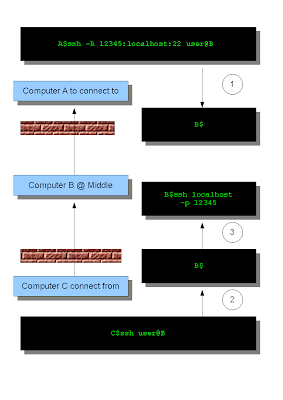
If you have ever connected to your cooperate network using VPN you may understand the complexity of the tools and configurations IT engineers must deal with. In Windows world, it's true. To do anything that looks complicated there's always some software available, to make simple tasks over complicated. Say if you want to access your home Linux machine from your office. Both are behind firewall and use NAT. You don't have permission to change firewall settings. We see this a very common scenario in today's world. We don't need VPN or any software to connect to home machine (A). What we need is a machine (B) at middle and through B we can connect to A with ssh connection from the machine (C) you are working on. This is the easiest solution I found so far. No need for VPN, expensive software, configuration, ... all you need is ssh. ssh has a very useful parameter -R. This tells ssh server at remote (B) will forward the given port number to itself (A). For more deta...
Comments